Use a cycling speed calculator when you know any two numbers—distance, time, or speed—and want the third without guessing. The main thing is to keep the units consistent and decide whether you are calculating moving time or the full time from leaving to arriving.
How to use a cycling speed calculator
The calculation is simple, but the setup matters. Pick the result you want first, enter the two values you already know, keep miles with mph or kilometers with km/h, then check whether your time is written in hours rather than clock minutes.
Choose speed, time, or distance
Start with the missing number, not the formula. If you rode a route and want to know your pace, calculate speed. If you know the route and your expected pace, calculate time. If you only know how long you can ride, calculate distance.
- Average speed: distance ÷ time
- Ride time: distance ÷ speed
- Distance covered: speed × time
Enter the two values you know
Use the most reliable numbers you have. A planned 20-mile route and a realistic 15 mph average are useful for estimating arrival time; a rough "about an hour" ride is less useful unless you are only making a loose plan.
Time is the value most likely to cause trouble. For these formulas, 45 minutes is 0.75 hours, not 0.45 hours. If your ride app shows 1:30, enter 1.5 hours.
Select miles or kilometers
Keep one unit system from start to finish. Miles go with mph, and kilometers go with km/h. Mixing a 30-mile route with a 25 km/h speed target will give the wrong answer unless you convert first.
- 1 mile is about 1.609 kilometers
- 1 kilometer is about 0.621 miles
- 15 mph is about 24.1 km/h
Calculate the missing value
Once the units match, the math is quick. Divide distance by time for speed, divide distance by speed for time, or multiply speed by time for distance.
After the calculator gives the clean number, decide what the number represents. For a quiet bike path loop, moving time may be close to your real finish time. For a city commute with traffic lights, the same moving average can be much too optimistic for when you actually arrive.
Cycling calculation examples
These examples use miles and mph, but the same logic works with kilometers and km/h. The useful habit is to write time in hours before you calculate, then convert the answer back into normal hours and minutes if needed.
Average speed for 12 miles in 45 minutes
Convert 45 minutes to 0.75 hours, then divide distance by time.
Speed = 12 ÷ 0.75 = 16 mph
So the average speed is 16 mph. If you accidentally divide 12 by 45, the result is not a cycling speed you can use because the time was never converted into hours.
Ride time for 20 miles at 15 mph
Divide the distance by the speed: 20 ÷ 15 = 1.333 hours. The full hour is easy; the remaining 0.333 hour is about 20 minutes, so the ride time is roughly 1 hour 20 minutes.
Treat that as moving time. If the 20 miles are through town with stoplights, add a small buffer. If it is a steady rural road ride, the calculator result may be close enough on its own.
Distance covered in 2 hours at 15 mph
Multiply speed by time: 15 × 2 = 30 miles. At the same pace for two full moving hours, you would cover 30 miles.
In metric, the matching example would be 25 km/h for 2 hours, which gives 50 kilometers. The formula has not changed; only the units have.
Common calculation mistakes
Most bad cycling estimates come from one of four mistakes: wrong time format, mixed units, unclear stop time, or averaging speeds the wrong way. If your result looks strangely fast or slow, check these before blaming the calculator.
Treating minutes as decimal hours
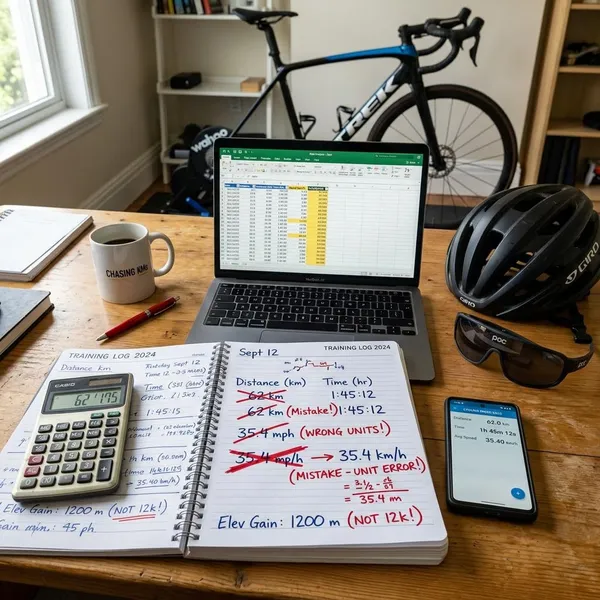
Clock time is not decimal time. One hour and 30 minutes is 1.5 hours, not 1.30 hours. One hour and 45 minutes is 1.75 hours, not 1.45 hours.
- 15 minutes = 0.25 hours
- 30 minutes = 0.5 hours
- 45 minutes = 0.75 hours
- 90 minutes = 1.5 hours
Mixing miles and kilometers
This usually happens when a route is shown in miles but a training target is shown in km/h, or when an event page uses kilometers while your bike computer is set to miles. Convert one side before calculating; do not rely on the result until distance and speed are in the same system.
Mixing moving time and elapsed time
Moving time tells you how fast you rode while the bike was rolling. Elapsed time tells you how long the whole outing took, including traffic lights, snack stops, regrouping, and mechanical delays.
For fitness comparisons, moving time is usually cleaner. For planning dinner, daylight, a train connection, or a school pickup, elapsed time is the number that matters.
Averaging ride speeds without weighting ride time
You cannot always average two speeds by taking the middle value. If you ride 30 minutes at 12 mph and 90 minutes at 18 mph, the true average is not 15 mph because you spent more time at the faster speed.
- 12 mph × 0.5 hours = 6 miles
- 18 mph × 1.5 hours = 27 miles
- Total: 33 miles in 2 hours
- True average: 33 ÷ 2 = 16.5 mph
The safer method is to add total distance first, then divide by total time.
How to estimate a realistic cycling finish time
A calculator gives a baseline, not a promise. To make the estimate useful for an actual ride, start with your normal pace and adjust for the things that slow real riders down: terrain, wind, stops, and fatigue.
Start with your average on similar rides
Your own past rides are usually better than a generic speed chart. A rider who averages 14 mph on rolling solo rides should not plan a long hilly route at 18 mph just because the distance looks manageable.
Match the situation as closely as possible. A flat 45-minute evening ride is a poor guide for a four-hour weekend route. A steady road ride also predicts finish time better than a stop-start errand ride with traffic and crossings.
Allow for hills and wind
Hills and headwinds can lower your average even when your effort feels the same. If the route is flat and calm, your usual average may be fine. If it is exposed, rolling, or has repeated climbs, use a more conservative speed before calculating the time.
- Flat, familiar route: start with your normal average
- Rolling or breezy route: reduce the estimate slightly
- Long climbs or strong wind: plan with a noticeably slower pace
Add time for traffic and breaks
If the goal is "What time will I be home?", add stop time after calculating moving time. A short city ride might need only 5 to 10 extra minutes, while a longer social ride with water stops or regrouping can easily need 15 to 30 minutes or more.
This is where two riders with the same average speed can have different real finish times. A solo training loop with no stops and a casual group ride with café breaks should not be planned from the same elapsed-time assumption.
Account for fatigue on longer rides
A pace that feels easy for one hour may not hold for three or four hours. For longer rides, estimate in sections instead of using one optimistic speed for the full distance.
A practical approach is to calculate the first half at your normal endurance pace and the second half a little slower. If the route also has heat, climbing, uncertain fueling, or a late headwind, build in more time rather than planning around a best-case average.

Conclusion
A cycling speed calculation is most useful when the math and the ride situation match. Get the units right, choose moving time or elapsed time on purpose, then adjust the clean result for hills, wind, stops, and fatigue. If the estimate is for a real arrival time rather than a training average, it is better to be slightly conservative than to plan around a perfect ride.